

Last Updated on October 12, 2026 by Elegance
Automatic gate troubleshooting should start with the symptom, not a reset. A gate that does nothing, opens but will not close, reverses partway, ignores a remote or suddenly becomes noisy can point to different fault categories: power or control inputs, safety devices, mechanical resistance, or the operator and controller. For context on the full entrance system, see wrought iron driveway gates Melbourne.
Start with safe external, non-invasive checks and only owner tasks expressly permitted for the installed equipment. Never bypass safety beams, increase motor force to overcome resistance, open electrical equipment or deliberately reproduce an unsafe fault. If the gate moves unpredictably, looks unstable or presents an immediate danger, stop troubleshooting.
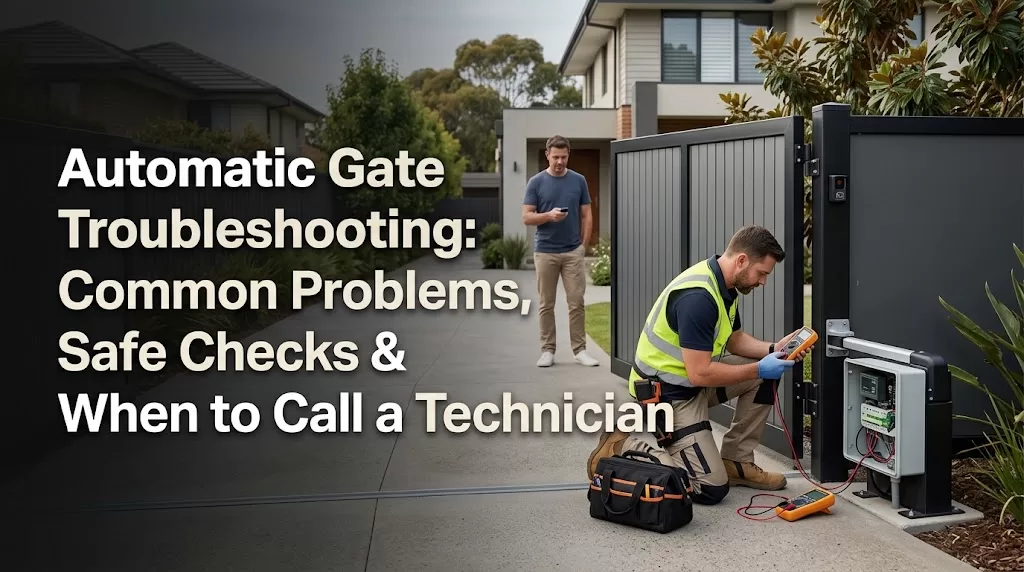
Hero image caption: An automatic wrought-iron driveway gate being visually inspected from outside its travel area, with electrical enclosures closed and no exposed wiring.
Quick troubleshooting table
A symptom can narrow the diagnostic path, but it rarely identifies one failed component by itself. Use the table to decide what can be checked safely and where homeowner troubleshooting should stop.
| Symptom | Likely category | Safe check | Stop-and-call trigger |
|---|---|---|---|
| Dead / no response | Power, control input, manual-release state, controller or motor | Check a known outage, normally accessible power controls and another authorised control | Power appears available but there is no response, or electrical damage is visible |
| Opens but will not close | Photocell, safety input, obstruction or closing logic | With the gate stationary, inspect the travel area and visible safety-beam path from outside the movement zone | Fault repeats with a clear path, or safety equipment appears damaged or displaced |
| Stops or reverses | Obstruction, mechanical resistance, safety input, limit or controller issue | Use what you already observed about where it stopped; inspect for obvious obstruction only while the gate is stationary | Repeated reversal, binding, collision or irregular movement |
| One remote fails | Remote battery or transmitter | Try another authorised control and replace the remote battery if its owner instructions permit it | Other controls also fail or programming would be required |
| Slow or noisy | Hinges, rollers, track, alignment, motor or gearbox | From a safe position, note where noise, rubbing or hesitation was already observed | Grinding, severe resistance, wobbling or worsening movement |
| Intermittent | Power, connection, weather-related issue, battery or controller | Record when the fault occurred and which normal controls still worked | Unexpected movement, recurring failures or electrical symptoms |
| Beeping / warning | Controller, battery, charging or equipment-specific warning | Record the beep pattern or externally visible code and identify the installed equipment | Warning persists, cannot be identified from owner information or accompanies unsafe operation |
Do not enter, reach into or clear anything from the travel area while the gate is moving or capable of moving unpredictably. If an obstruction cannot be removed safely with the gate stationary and stable, leave it for a technician.
Diagnostic flowchart caption: No movement → check safe external power and command inputs. Starts then stops or reverses → consider obstruction, safety input or mechanical resistance. Slow or noisy → consider mechanical condition and servicing. Unexpected or unsafe movement → stop operation and arrange professional assessment.

Automatic gate will not open or close at all
A completely unresponsive gate follows a different diagnostic path from one that begins moving and then stops. Start with the parts of the system you can check externally without opening the motor housing, controller or electrical enclosure.
Start with accessible power and controls
Check whether there has been a known power outage and whether a normally accessible gate isolator or power point has been switched off. If a circuit has tripped, do not repeatedly reset it to keep the gate running. A recurring trip requires electrical diagnosis.
Try another normal authorised control if one is already available. A control input is simply something that gives the gate a command, such as a remote, keypad or intercom. If a keypad or second remote works while one transmitter does not, the gate motor is clearly not completely unresponsive.
If no normal control produces a response, note any externally visible indicator light, display message or usual sound from the operator. Do not remove a cover to inspect the control board, wiring or terminals.
Consider the manual-release state without guessing
A gate operator that remains disengaged after manual operation may behave differently from one that is mechanically connected to the gate. Manual-release mechanisms vary considerably, so use only a procedure expressly identified for the owner of the exact installed operator.
Do not experiment with an unfamiliar lever, key, clutch or release mechanism. If the gate is derailed, badly sagged, unstable or difficult to control manually, do not force it by hand to test whether the motor is responsible.
Gate opens but will not close
A gate that opens normally but refuses to close often directs attention towards the closing safety path, an obstruction or the control logic used during closing. Mechanical resistance can produce a similar result, so the symptom should guide the next check rather than be treated as a diagnosis.
Check the safety-beam path from a safe position
Photocells, often called safety beams, monitor a defined path. With the gate stationary, look for vegetation, dirt, an object in the beam path or obvious physical damage to an accessible sensor. You can also note if a sensor appears to have been knocked from its previous position, but do not reposition or adjust it as part of troubleshooting.
Only remove an obvious obstruction if the gate is stationary, stable and the object is reachable without entering a hazardous movement area. Never reach through, across or around a gate that is operating or behaving unpredictably.
A visibly clear beam path does not confirm that the photocells, their alignment, wiring or controller input are functioning correctly. If the gate still refuses to close, the safety and control system needs further diagnosis. For the separate safety-device guide, see automatic gate safety.
Never bypass a safety input
Do not tape over, bridge, disconnect or disable a photocell or other safety input to make the gate close. This prohibition does not change because a manual, installer or online source describes how safety devices are wired or programmed.
Unusual auto-close timing can also be useful information. Record what happened, but do not enter programming menus or alter timers unless the exact operator documentation expressly identifies that procedure as an owner task.
Gate stops halfway or reverses
When a gate stops partway or reverses, the controller may be responding to mechanical resistance, an obstruction input, a safety device, travel information or another control condition. The same visible behaviour can therefore originate in different parts of the system.
Use what you have already observed
Think about the most recent normal attempts to operate the gate. Did it already stop at roughly the same location, or did the stopping point vary? That information can help a technician narrow the diagnostic path.
Do not deliberately run a repeatedly reversing or unsafe gate again simply to confirm the stopping point.
With the gate stationary, look from outside the travel area for an obvious stone or debris in an accessible sliding-gate track, an object within a swing arc, new rubbing or a visible alignment change. If checking or clearing the area would put you where the gate could move towards you, stop.
Mechanical resistance and control responses can overlap
A binding hinge, damaged roller, distorted gate or track problem can make the drive system work against greater resistance. Depending on the operator, the resulting behaviour may resemble a safety-device or travel-limit problem.
Limit settings tell an operator where its intended travel ends. Force, obstruction and limit settings influence gate movement and safety behaviour, so they should not be adjusted as a way to make a struggling gate push through resistance.
If the gate binds, the mechanical cause needs to be addressed rather than masked by increasing force or torque.
Remote or keypad does not work
A failed remote does not automatically mean the gate operator has failed. The most useful distinction is whether one control, all wireless controls or every normal control method is affected.
One remote fails but another control works
If another programmed remote, keypad or intercom still operates the gate normally, start with the failed device. For a handheld transmitter, replacing its battery is a reasonable homeowner task when the remote’s owner instructions permit battery replacement.
An illuminated LED on a remote only tells you something about the handset itself; it does not prove successful communication with the gate receiver.
If a battery change does not help, avoid guessing at pairing or programming sequences from another model.
All remotes fail, but another input still works
If several wireless remotes stop working while a wired keypad, intercom or another normal input still operates the gate, that pattern points towards the radio-control path rather than proving the receiver itself has failed.
Useful details include whether every programmed remote stopped at the same time and whether non-wireless controls remain normal. Product-specific diagnosis may then be required.
Every normal control fails
If remotes, keypad, intercom and other normal inputs all fail, the issue is broader than one transmitter. Power, the controller, another system input or the operator itself may need investigation.
Avoid universal reset sequences found online. A factory reset, receiver erase or re-learning procedure can change stored settings without correcting the underlying fault.
Gate is slow, noisy or struggling
A gate that becomes noticeably slower, louder or harder-working deserves attention because the motor may be reacting to a mechanical issue elsewhere in the entrance.
Look for a change in movement
For a swing gate, observe from outside the movement area whether there is new sagging, rubbing, hinge movement or a change in the normal arc. For a tracked sliding gate, look at visible track areas for debris and note any previously observed wobbling or uneven movement.
Cantilever gates have different support arrangements, so the same noise does not point to the same component across every gate type.
Where the sound occurs is more useful than the sound alone. A technician will want to know whether grinding, clicking or vibration was associated with hesitation, rubbing or a particular part of travel.
Grinding, severe binding or instability means stop
Do not keep cycling a gate that grinds, binds heavily, leaves its normal track, wobbles severely or appears structurally unstable. Continuing powered operation may worsen the underlying problem.
Do not increase motor force to compensate. The gate hardware and travel condition need to be assessed before controller adjustments are considered.
Routine service schedules belong to maintenance rather than fault diagnosis. Once the immediate problem has been resolved, servicing should follow the actual gate, operator, usage and manufacturer or installer requirements. The separate automatic gate maintenance guide covers routine checks and servicing schedules.
Intermittent faults, beeping and post-blackout problems
Intermittent faults can be difficult to diagnose because the gate may appear normal by the time it is inspected. A concise record of what was already observed is more useful than repeatedly operating the gate or trying resets.
Record patterns without recreating them
For Melbourne properties, rain, debris and other outdoor conditions can coincide with a fault, but timing alone does not establish moisture damage or sensor failure.
Record whether the problem was noticed after rain, following a power interruption, at a particular time, after several ordinary operations or during one part of travel. Do not deliberately repeat the conditions or keep cycling the gate if the behaviour is abnormal.
If the gate opens or closes unexpectedly without the usual command, stop normal use and report exactly what occurred. Do not experiment with remotes, sensors or programming to see whether you can make the movement happen again.
After a blackout
A power failure may expose a separate battery, charging or control issue when supply returns. Some automatic gates have backup batteries and others do not, while the behaviour during and after an outage depends on the installed equipment. For power-source and backup planning, compare solar vs mains-powered automatic gates.
If access is required during an outage, use a manual-release procedure only when the exact operator documentation expressly identifies it as an owner procedure and the gate is mechanically safe to move.
After power returns, do not assume the controller needs a factory reset or limit re-learning. Those are configuration procedures, not universal post-blackout steps.
Beeping and warning indicators
Automatic gate beeping may correspond to a battery condition, controller warning, obstruction event or another equipment-specific status. There is no universal meaning for a particular beep pattern.
Record the pattern, any externally visible code and the make or model shown on accessible labels or existing paperwork. Use owner information for the exact installed equipment rather than interpreting a code from another brand.

What to tell the technician
You can make fault finding more efficient without opening equipment or recreating the problem. Prepare:
- the gate and operator make/model if visible externally or recorded in existing paperwork;
- the symptom and approximately when it began;
- which normal controls still work and which do not;
- any stopping location, noise or movement change already observed;
- externally visible warning codes, lights or beep patterns;
- any recent blackout, collision, repair, landscaping or paving work that may be relevant.
Photos taken from a safe position can also help. Do not dismantle covers, enter a hazardous gate area or operate an unsafe gate merely to collect more information.
What homeowners should not troubleshoot themselves
Homeowner troubleshooting should end when the next step requires electrical access, alteration of a safety system, specialist programming or work on powered or unstable mechanical components.
Leave electrical and internal control work to qualified people
Do not remove mains or controller covers to probe terminals, test internal wiring or work on 240-volt components. Energy Safe Victoria advises consumers not to do their own electrical work and to engage a Registered Electrical Contractor for electrical installation work.
Official safety guidance
“Electrical work isn’t a DIY job”
Energy Safe Victoria explains that electrical installation work must be completed by an appropriately licensed electrician. This reinforces the distinction here between observing a gate fault from a safe position and opening electrical equipment or carrying out electrical repairs.
Source: Energy Safe Victoria, Electrical DDIY – Don’t do it yourself. Read the official guidance.
Never bypass, bridge, disconnect or disable photocells, safety beams or other safety inputs to keep the gate operating.
Unless the exact manufacturer documentation expressly identifies a procedure as an owner task for that operator or controller, leave activities such as these to an appropriate technician:
- changing force or obstruction settings;
- re-learning travel or limit settings;
- altering control-board wiring;
- performing factory resets or broad programming changes;
- dismantling a motor, gearbox or powered mechanism.
Installer, commissioning and service instructions should not be treated as homeowner permission merely because they are available online.
Use manual release only as an owner procedure
A manual release disengages the drive so a gate can be moved without normal powered operation, but the mechanism and safe sequence vary between systems.
Follow only the owner procedure for the exact installed equipment. If the gate is unstable, derailed, badly binding or difficult to control manually, leave it in a safe condition rather than forcing movement.
When to stop using the gate
Troubleshooting should stop when continued operation could worsen damage or expose people, vehicles or property to unsafe movement.
Stop normal operation and arrange assessment
Do not continue automatic operation if the gate has:
- significant collision or structural damage;
- severe binding or grinding;
- a leaning, unstable or derailed leaf;
- a known safety device that is damaged or not responding as intended;
- repeated unexplained opening, closing, stopping or reversing;
- unexpected movement without the usual command;
- movement that places people, vehicles or property at risk.
Keep people and vehicles outside the gate’s movement area. Do not continue cycling the gate to see whether the fault clears itself.
Treat immediate danger as an emergency
A burning smell, scorching or other electrical damage requires the gate to remain out of normal use and needs prompt professional attention.
If there are active flames, significant smoke, an electric shock, or another immediate threat to life or property, do not approach or touch the gate equipment. Move to safety and call Triple Zero (000). An active emergency is not a routine gate-repair booking.
FAQs
Why is my automatic gate not opening?
Start by noting which normal controls still work. Tell the technician whether another remote, keypad or intercom responds and whether the operator showed any externally visible light, display or usual sound when the problem occurred. Those observations help separate an individual control problem from a broader power or operator fault without opening the controller.
Why does my gate open but not close?
A visible obstruction, vegetation across a beam path or an obviously displaced sensor is useful information, but do not adjust the sensor yourself. Take note of what you can see while the gate is stationary and stay outside its movement area. A clear-looking beam path does not prove that the safety system is functioning correctly.
Why does my automatic gate stop halfway and reverse?
Report the stopping location that you already observed during normal use, especially if it appeared to coincide with rubbing, debris or a change in movement. Do not repeatedly run the gate to establish a pattern if it is already reversing, binding or behaving unsafely. The observed location is diagnostic information, not proof of a particular failed component.
Can I reset an automatic gate motor myself?
Only use a reset when the documentation for your exact operator expressly identifies it as an owner procedure for the situation you are dealing with. That is different from a factory reset, commissioning sequence or limit re-learning process. Avoid generic online reset instructions because they can alter stored settings without repairing the fault.
Why is my gate remote not working?
One failed remote while another control works points towards that individual device. If every wireless remote fails but a keypad, intercom or other normal input still works, the radio-control path becomes more relevant. If all normal control methods fail, treat it as a broader system problem rather than replacing multiple remotes.
Why is my automatic gate beeping?
Identify the operator from an accessible label or existing paperwork and record the exact beep pattern or visible code. The same number of beeps does not have a universal meaning across different gate systems. If the warning repeats or accompanies abnormal movement, stop experimenting and give the recorded information to the technician.
When should I stop using an automatic gate?
Stop normal use when the gate is unstable, severely binding, repeatedly moving unexpectedly, collision-damaged or has a known safety-device fault. Burning smells, scorching or visible electrical damage also require prompt attention. If there are flames, significant smoke, electric shock or another immediate danger to life or property, stay clear and call Triple Zero (000) rather than treating it as a routine repair.
If the fault repeats, involves safety equipment or electrical components, or the gate has severe mechanical resistance, request an automatic-gate assessment. The useful starting point is the symptom, what was already observed and which normal controls still work — not another reset or another test cycle. If an assessment raises a repair-versus-replacement decision, the gate automation cost in Melbourne guide explains broader equipment and installation cost factors.


